이전 글 : https://decompression.tistory.com/19
컨테이너 런타임 만들기 : Phase 3
이전 글 : https://decompression.tistory.com/14 컨테이너 런타임 만들기 : Phase 2이전 포스트https://decompression.tistory.com/12 컨테이너 런타임 만들기 : Phase 1컨테이너의 동작을 이해하기 위해 컨테이너 런타임
decompression.tistory.com
평범한 컨테이너의 사용사례는 아래와 같다.
docker pull image
docker run image
이렇듯 컨테이너 프로세스 생성은 image를 기반으로 동작을 처리하게 되는데.
이 이미지 내부에는 저수준 컨테이너 런타임이 사용할 bundle directory가 포함된다.
bundle directory는 아래와 같은 구조를 지닌다.
bundle directory
ㄴ config.json (spec)
ㄴ root directory
이전에 만든 ubuntufs를 번들 디렉터리로 만들어보자.
Makefile#L9-65
setup-ubuntu:
    docker create --name temp-ubuntu ubuntu:22.04
    mkdir -p /root/testbundle/ubuntufs
    docker export temp-ubuntu -o /tmp/ubuntu.tar
    tar -xf /tmp/ubuntu.tar -C /root/testbundle/ubuntufs
    rm /tmp/ubuntu.tar
    docker rm temp-ubuntu
    printf '%s\n' '{' \
    '"ociVersion": "1.0.2",' \
    '"process": {' \
        '"terminal": true,' \
        '"user": { "uid": 0, "gid": 0 },' \
        '"args": ["/bin/bash"],' \
        '"env": [' \
            '"PATH=/usr/local/sbin:/usr/local/bin:/usr/sbin:/usr/bin:/sbin:/bin",' \
            '"TERM=xterm"' \
        '],' \
        '"cwd": "/",' \
        '"capabilities": {' \
            '"bounding": ["CAP_AUDIT_WRITE","CAP_KILL","CAP_NET_BIND_SERVICE"],' \
            '"effective": ["CAP_AUDIT_WRITE","CAP_KILL","CAP_NET_BIND_SERVICE"],' \
            '"inheritable": ["CAP_AUDIT_WRITE","CAP_KILL","CAP_NET_BIND_SERVICE"],' \
            '"permitted": ["CAP_AUDIT_WRITE","CAP_KILL","CAP_NET_BIND_SERVICE"],' \
            '"ambient": ["CAP_AUDIT_WRITE","CAP_KILL","CAP_NET_BIND_SERVICE"]' \
        '},' \
        '"rlimits": [{ "type": "RLIMIT_NOFILE", "hard": 1024, "soft": 1024 }],' \
        '"noNewPrivileges": true' \
    '},' \
    '"root": { "path": "/root/testbundle/ubuntufs", "readonly": false },' \
    '"hostname": "oci-ubuntu",' \
    '"mounts": [' \
        '{ "destination": "/proc", "type": "proc", "source": "proc" },' \
        '{ "destination": "/dev", "type": "tmpfs", "source": "tmpfs", "options": ["nosuid","strictatime","mode=755","size=65536k"] },' \
        '{ "destination": "/dev/pts", "type": "devpts", "source": "devpts", "options": ["nosuid","noexec","newinstance","ptmxmode=0666","mode=0620","gid=5"] },' \
        '{ "destination": "/dev/shm", "type": "tmpfs", "source": "shm", "options": ["nosuid","noexec","nodev","mode=1777","size=65536k"] },' \
        '{ "destination": "/dev/mqueue", "type": "mqueue", "source": "mqueue", "options": ["nosuid","noexec","nodev"] },' \
        '{ "destination": "/sys", "type": "sysfs", "source": "sysfs", "options": ["nosuid","noexec","nodev","ro"] }' \
    '],' \
    '"linux": {' \
        '"resources": { "devices": [{ "allow": false, "access": "rwm" }] },' \
        '"namespaces": [' \
            '{ "type": "pid" },' \
            '{ "type": "network" },' \
            '{ "type": "ipc" },' \
            '{ "type": "uts" },' \
            '{ "type": "mount" }' \
        '],' \
        '"maskedPaths": [' \
            '"/proc/kcore", "/proc/latency_stats", "/proc/timer_list", "/proc/timer_stats",' \
            '"/proc/sched_debug", "/proc/scsi", "/sys/firmware"' \
        '],' \
        '"readonlyPaths": [' \
            '"/proc/asound", "/proc/bus", "/proc/fs", "/proc/irq",' \
            '"/proc/sys", "/proc/sysrq-trigger"' \
        ']' \
    '}' \
    '}' > /root/testbundle/config.json
Makefile에 setup-ubuntu로 만들었다.
각 필드에 대해 자세한 사항은 runtime-spec을 참고하자 먼저 스펙을 다룰 유틸리티 파일을 만들었다.
internal/container/spec.go
package container

import (
"encoding/json"
"fmt"
"os"

"github.com/opencontainers/runtime-spec/specs-go"
)

func loadSpec(specPath string) (*specs.Spec, error) {
var spec specs.Spec
f, err := os.Open(specPath)
if err != nil {
return nil, fmt.Errorf("container: failed to open spec file at %s: %w", specPath, err)
}
defer f.Close()

if err := json.NewDecoder(f).Decode(&spec); err != nil {
return nil, fmt.Errorf("container: failed to decode spec JSON from %s: %w", specPath, err)
}

return &spec, nil

}
그리고 create등을 spec기반으로 처리할 수 있도록 변경한다.
// Create initializes a new container with the given ID and root filesystem path.
func Create(containerID, bundlePath string) error {

	bundlePath, err := filepath.Abs(bundlePath)
	if err != nil {
		return fmt.Errorf("container: failed to get absolute path for bundle: %w", err)
	}

	configPath := filepath.Join(bundlePath, "config.json")

	state := newContainerState(containerID, bundlePath)

	spec, err := loadSpec(configPath)
	if err != nil {
		return err
	}

	if err := saveState(state); err != nil {
		return fmt.Errorf("container: failed to save initial state: %w", err)
	}

	cgroup.SetupCgroups()

	selfExe, err := os.Executable()
	if err != nil {
		return fmt.Errorf("container: failed to get executable path: %w", err)
	}

	cmd := exec.Command(selfExe, append([]string{"init"}, spec.Process.Args...)...)
	cmd.Stdin = os.Stdin
	cmd.Stdout = os.Stdout
	cmd.Stderr = os.Stderr

	var cloneFlags uintptr
	for _, ns := range spec.Linux.Namespaces {
		switch ns.Type {
		case specs.PIDNamespace:
			cloneFlags |= syscall.CLONE_NEWPID
		case specs.UTSNamespace:
			cloneFlags |= syscall.CLONE_NEWUTS
		case specs.MountNamespace:
			cloneFlags |= syscall.CLONE_NEWNS
		case specs.IPCNamespace:
			cloneFlags |= syscall.CLONE_NEWIPC
		case specs.NetworkNamespace:
			cloneFlags |= syscall.CLONE_NEWNET
		case specs.UserNamespace:
			cloneFlags |= syscall.CLONE_NEWUSER
		case specs.CgroupNamespace:
			cloneFlags |= syscall.CLONE_NEWCGROUP
		case specs.TimeNamespace:
			cloneFlags |= syscall.CLONE_NEWTIME
		}
	}

	cmd.SysProcAttr = &syscall.SysProcAttr{
		Cloneflags: cloneFlags,
	}

	r, w, err := os.Pipe()
	if err != nil {
		return fmt.Errorf("container: failed to create pipe: %w", err)
	}
	defer w.Close()

	cmd.ExtraFiles = []*os.File{r}

	if err := cmd.Start(); err != nil {
		return fmt.Errorf("container: failed to start command: %w", err)
	}

	if err := json.NewEncoder(w).Encode(&spec); err != nil {
		return fmt.Errorf("container: failed to encode spec: %w", err)
	}

	state.Pid = cmd.Process.Pid
	state.Status = specs.StateCreated

	if err := saveState(state); err != nil {
		return fmt.Errorf("container: failed to update state with PID: %w", err)
	}

	return nil
}
이제 create에서 분리되는 init process은 이전의 고정적인 실행구조에서
탈피하여 spec을 전해받을 매개가 필요하다.
create함수에서는 os pipe를 생성하여 init process에 ExtraFiles로 넘겨준다.
	r, w, err := os.Pipe()
	if err != nil {
		return fmt.Errorf("container: failed to create pipe: %w", err)
	}
	defer w.Close()

	cmd.ExtraFiles = []*os.File{r}
넘김받은 파이프는 첫 번째 FD(File Descriptor)로 들어가게 되고.
이는 표준 입/출력/에러를 제외하고 fd3에 열리게 된다.
그럼 init에서는 전달받은 파이프를 리슨하여 spec을 받는다.
이후 spec에 정의된 작업을 수행한다.
func Init() {
	pipe := os.NewFile(3, "pipe")
	if pipe == nil {
		log.Fatalf("container: failed to create pipe")
	}
	defer pipe.Close()

	var spec specs.Spec
	if err := json.NewDecoder(pipe).Decode(&spec); err != nil {
		log.Fatalf("container: failed to decode spec: %v", err)
	}

	ch := make(chan os.Signal, 1)

	signal.Notify(ch, syscall.SIGCONT)
	<-ch

	if spec.Hostname != "" {
		if err := syscall.Sethostname([]byte(spec.Hostname)); err != nil {
			log.Fatalf("container: failed to set hostname: %v", err)
		}
	}

	rootfs := spec.Root.Path

	if err := syscall.Mount(rootfs, rootfs, "", syscall.MS_BIND|syscall.MS_REC, ""); err != nil {
		log.Fatalf("container: failed to bind mount rootfs: %v", err)
	}

	pivotDir := filepath.Join(rootfs, ".old_root")

	if err := os.MkdirAll(pivotDir, 0755); err != nil {
		log.Fatalf("container: failed to create pivot directory %s: %v", pivotDir, err)
	}

	if err := syscall.PivotRoot(rootfs, pivotDir); err != nil {
		log.Fatalf("container: failed to pivot root to %s: %v", rootfs, err)
	}

	if err := os.Chdir("/"); err != nil {
		log.Fatalf("container: failed to change directory to /: %v", err)
	}

	for _, m := range spec.Mounts {
		if err := os.MkdirAll(m.Destination, 0755); err != nil {
			log.Fatalf("container: failed to create mount destination %s: %v", m.Destination, err)
		}

		if err := syscall.Mount(m.Source, m.Destination, m.Type, 0, ""); err != nil {
			log.Fatalf("container: failed to mount %s: %v", m.Destination, err)
		}
		defer func(dest string) {
			if err := syscall.Unmount(dest, 0); err != nil {
				log.Printf("container: failed to unmount %s: %v", dest, err)
			}
		}(m.Destination)
	}

	if err := syscall.Exec(spec.Process.Args[0], spec.Process.Args, os.Environ()); err != nil {
		log.Fatalf("container: failed to exec command %s: %v", spec.Process.Args[0], err)
	}
}
추가로 cmd 디렉터리에 main.go 하나로 통일했다.
굳이 나눌 필요가 없었다.
실제 실행시 잘 작동한다.
[yhw@hyunwooyoon containeruntime]$ sudo ./containeruntime create ubuntu /root/testbundle
ubuntu
[yhw@hyunwooyoon containeruntime]$ sudo ./containeruntime state ubuntu
{
  "ociVersion": "1.2.1",
  "id": "ubuntu",
  "status": "created",
  "pid": 5158,
  "bundle": "/root/testbundle"
}[yhw@hyunwooyoon containeruntime]$ sudo ./containeruntime start ubuntu
[yhw@hyunwooyoon containeruntime]$ root@oci-ubuntu:/#
이외에도 Cgroup관련 설계를 진행했다.
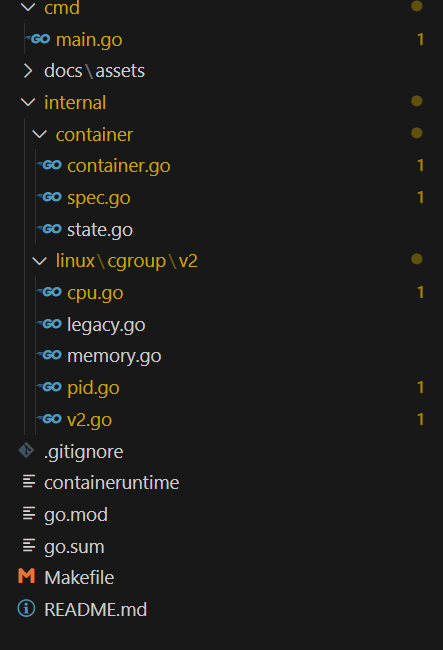
cgroup SubSystem에 맞는 구조체를 짜넣고 Cgroup Manager에 넣어두면
CgroupManager.Setup()을 통해 Cgroup을 spec에 맞게 설정할거다.
package cgroup

import (
	"fmt"
	"os"
	"path/filepath"
)

// CgroupManager manages the cgroups for a container.
type CgroupManager struct {
	root          string
	containerName string
	subsystems    []SubSystem
}

// SubSystem represents a cgroup v2 controller.
type SubSystem interface {
	Name() string
	Setup(path string) error
	Clean(path string) error
}

// NewCgroupManager creates a new CgroupManager for a given container name.
func NewCgroupManager(containerName string, subsystems []SubSystem) *CgroupManager {
	return &CgroupManager{
		root:          "/sys/fs/cgroup",
		containerName: containerName,
		subsystems:    subsystems,
	}
}

// Setup creates the cgroup hierarchy and configures all subsystems.
func (m *CgroupManager) Setup() error {
	containerCgroup := filepath.Join(m.root, m.containerName)
	if err := os.Mkdir(containerCgroup, 0755); err != nil && !os.IsExist(err) {
		return fmt.Errorf("cgroup: failed to create container cgroup: %w", err)
	}

	var controllers []string
	for _, s := range m.subsystems {
		controllers = append(controllers, "+"+s.Name())
	}
	if len(controllers) > 0 {
		ctrl := []byte(fmt.Sprintf("%s", controllers))
		if err := os.WriteFile(filepath.Join(containerCgroup, "cgroup.subtree_control"), ctrl, 0700); err != nil {
			return fmt.Errorf("cgroup: failed to set controllers: %w", err)
		}
	}

	for _, s := range m.subsystems {
		if err := s.Setup(containerCgroup); err != nil {
			return fmt.Errorf("cgroup: subsystem %s setup failed: %w", s.Name(), err)
		}
	}
	return nil
}

// Clean removes the cgroup hierarchy and cleans up all subsystems.
func (m *CgroupManager) Clean() error {
	containerCgroup := filepath.Join(m.root, m.containerName)
	for _, s := range m.subsystems {
		if err := s.Clean(containerCgroup); err != nil {
			return fmt.Errorf("cgroup: subsystem %s clean failed: %w", s.Name(), err)
		}
	}
	if err := os.Remove(containerCgroup); err != nil && !os.IsNotExist(err) {
		return fmt.Errorf("cgroup: failed to remove container cgroup: %w", err)
	}
	return nil
}
서브시스템들을 구현하면서는 Cgroup의 동작원리등의 대한 설명을
더 자세히 하려고 하기에 다음 글에서 이어서 진행하려고 한다.
이제 어느 정도 골자가 설계되었고 상세한 부분을 구현하며
실제 동작원리나 이론적인 부분들도 다루어보겠다.
설명되지 않은 변경사항은 다음 PR을 참고하자
https://github.com/yoonhyunwoo/containeruntime/pull/4
Config based processing by yoonhyunwoo · Pull Request #4 · yoonhyunwoo/containeruntime
need squash merge
github.com
참고자료